Direct Cluster Registration (Fallback)
Most setups should use the cluster connector — it’s outbound-only, exposes nothing, and hands Veris no cluster credentials. Use this direct path only when you can’t run an in-cluster component and would rather give Veris a scoped, revocable API-server token.
In direct mode, Veris connects inbound to your Kubernetes API server to create and manage jobs. You author the RBAC, export a token + CA certificate, and register them with Veris.
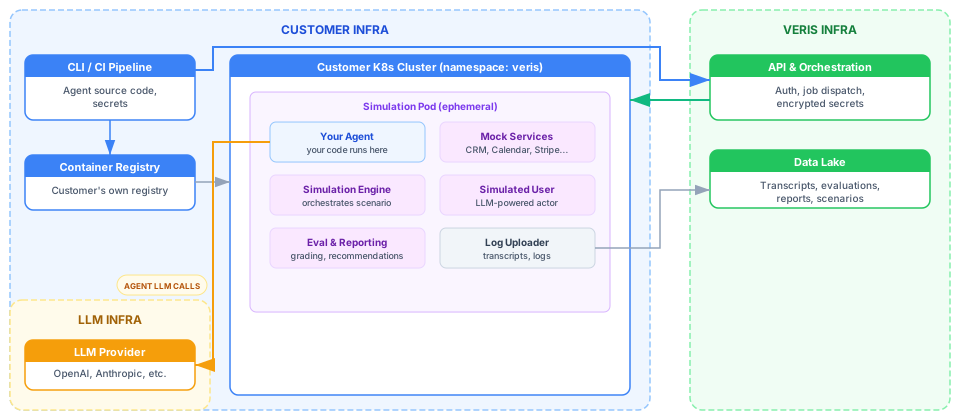
How it differs from the connector
| Cluster connector (recommended) | Direct registration (this page) | |
|---|---|---|
| Connection direction | Connector dials out to Veris | Veris connects in to your API server |
| Inbound exposure | None | API server reachable by Veris (443) |
| Credentials Veris stores | None | API URL + CA + token |
| RBAC | Bundled in the Helm chart | You author it, export a token |
Prerequisites
The cluster, registry, and image setup match the connector path — see What you need to provision for node sizing and registry & image pull (identical). Direct mode needs no helm and no in-cluster connector image; the local tooling is just kubectl, your cloud CLI (aws / gcloud), curl / jq, and the veris CLI. It adds one requirement the connector doesn’t have:
Inbound reachability. Your Kubernetes API server must be reachable from Veris on its API port (typically 443) — the Veris backend connects in to create and manage jobs. A public (or Veris-reachable) endpoint is required; fully private API-server endpoints aren’t supported in direct mode. Ask Veris for the egress IP ranges to allowlist in your security group / firewall. (The connector path needs no inbound rules at all.)
Setup
Create the Veris namespace
kubectl create namespace verisCreate a ServiceAccount with RBAC
The Veris backend needs permission to manage jobs in your namespace.
kubectl create serviceaccount veris-sa -n veris

kubectl apply -f - <<EOF
apiVersion: rbac.authorization.k8s.io/v1
kind: Role
metadata:
  name: veris-job-manager
  namespace: veris
rules:
- apiGroups: ["batch"]
  resources: ["jobs"]
  verbs: ["create", "get", "list", "delete", "watch"]
- apiGroups: [""]
  resources: ["pods", "pods/log"]
  verbs: ["get", "list", "watch"]
- apiGroups: [""]
  resources: ["secrets", "configmaps"]
  verbs: ["create", "get", "delete", "list"]
- apiGroups: [""]
  resources: ["namespaces"]
  verbs: ["get"]
EOF

kubectl create rolebinding veris-sa-binding \
  --role=veris-job-manager --serviceaccount=veris:veris-sa -n veris
Generate an authentication token
Long-lived token (recommended)
A Secret-bound token that does not expire:
kubectl apply -f - <<EOF
apiVersion: v1
kind: Secret
metadata:
  name: veris-sa-token
  namespace: veris
  annotations:
    kubernetes.io/service-account.name: veris-sa
type: kubernetes.io/service-account-token
EOF

kubectl get secret veris-sa-token -n veris -o jsonpath='{.data.token}' | base64 -dGet your cluster endpoint and CA certificate
EKS
aws eks describe-cluster --name YOUR_CLUSTER --region YOUR_REGION \
  --query 'cluster.{endpoint: endpoint, ca: certificateAuthority.data}' --output json
echo "BASE64_CA_DATA" | base64 -d # decode the CARegister the cluster with Veris
curl -X POST https://sandbox.api.veris.ai/v1/clusters \
  -H "Authorization: Bearer YOUR_VERIS_API_KEY" -H "Content-Type: application/json" \
  -d '{
    "organization_id": "YOUR_ORG_ID",
    "name": "my-production-cluster",
    "connection_mode": "direct",
    "provider": "eks",
    "api_server_url": "https://YOUR_CLUSTER_ENDPOINT",
    "ca_certificate": "-----BEGIN CERTIFICATE-----\n...\n-----END CERTIFICATE-----",
    "namespace": "veris",
    "auth_type": "token",
    "credentials": { "token": "YOUR_SA_TOKEN" },
    "image_registry_url": "YOUR_ACCOUNT.dkr.ecr.YOUR_REGION.amazonaws.com/YOUR_REPO"
  }'
image_registry_url tells Veris where your agent images live (the same field the connector uses). For ECR it’s the repository URI; for Artifact Registry, the full repository path.
Test connectivity
curl -X POST https://sandbox.api.veris.ai/v1/clusters/CLUSTER_ID/test \
  -H "Authorization: Bearer YOUR_VERIS_API_KEY"
# { "connected": true, "message": "Connected to eks cluster, namespace 'veris' exists", "server_version": "1.34" }
After this, build & push your agent image and run exactly as with the connector path. How a run reaches your cluster is the same, except Veris applies the Job by connecting inbound rather than the connector leasing it.
Managing your cluster
# Rotate the token (status resets to pending → re-run the connectivity test)
curl -X PUT https://sandbox.api.veris.ai/v1/clusters/CLUSTER_ID \
  -H "Authorization: Bearer YOUR_VERIS_API_KEY" -H "Content-Type: application/json" \
  -d '{"credentials": {"token": "NEW_TOKEN"}}'

# Remove
curl -X DELETE https://sandbox.api.veris.ai/v1/clusters/CLUSTER_ID \
  -H "Authorization: Bearer YOUR_VERIS_API_KEY"
Limitations
- Grading & risk run Veris-hosted (not on your cluster).
- One cluster per organization.
- Supported providers: EKS and GKE. Others may work with bearer-token auth but aren’t officially supported.
- GCS-based artifacts, written with a short-lived (≈1 hour) scoped storage token — jobs that exceed the window may fail to upload final results.
- Direct-mode specifics: your API server must remain reachable from Veris, and Veris stores your API URL, CA certificate, and token (encrypted) for the lifetime of the registration. (The connector-only limitations — emptyDir credential, unreaped connector secrets — don’t apply here.)