Use Cases
The sandbox is the core of Veris — your agent running against simulated users, triggers, and services. Once your agent is integrated (see Quickstart), the sandbox supports several distinct workflows. Most teams start with the development loop and pick up others as they grow.
Development loop

The default path for most Veris users. Simulate → read the report → fix the highest-leverage issue → push → re-simulate. Each pass narrows on the real failures. Most of the value of Veris lives here.
CI/CD regression gating

Wire Veris into the PR path. On every push, build the agent image, push a PR-specific tag, run the same scenario set you use in development, and fail the PR if eval scores drop below a baseline. veris run exits non-zero on evaluation failure, so it drops into CI as a gate without special plumbing.
→ CI/CD regression gating guide
Continuous improvement from production traces
Keep your scenario set in step with reality. On a schedule, pull your agent’s recent production traces, regenerate a fresh scenario set from them, then simulate and grade — so new failure modes from real traffic become tests automatically. This is the deliberate regeneration the development loop and CI gating leave to you.
→ Continuous improvement guide
Regulatory QA
For agents in regulated domains (financial services, healthcare, public-sector workflows), the same simulation loop becomes the evidence base. Scenarios cover the regulated cases. Graders encode the policies. Reports document what the agent did, where it deviated, and how the team responded.
This is a positioning frame rather than a distinct technical workflow — the mechanics are the dev loop and CI gating. What changes is which scenarios you prioritize, what your graders encode, and who reads the reports.
Training — Reinforcement Learning
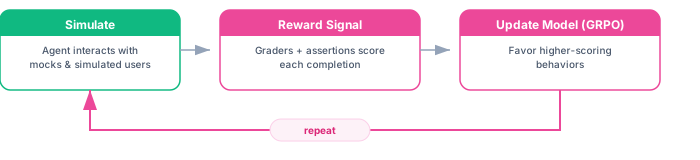
Use the simulation environment as a live training ground. Graders provide the reward signal; the model is updated to favor higher-scoring behaviors.
→ RL training guide · RL reference
Training — Supervised Fine-Tuning

Use high-scoring simulation transcripts as training data for SFT. Distills behavior from a larger model into a smaller, cheaper one. Depends on having a trustworthy grader and coverage of your real production distribution.
→ SFT training guide · SFT reference
All of these workflows run against the same sandbox and the same scenario sets. You don’t need separate integrations — once your agent is pushed, every use case is available.