Training
Veris turns your simulations into training infrastructure. The same scenarios and environments you use for evaluation become the data source for supervised fine-tuning and the training ground for reinforcement learning.
From Simulations to Training
Every simulation captures your agent’s full behavior: LLM calls, tool invocations, and conversation turns. Evaluations score that behavior. Together, they give you:
- Labeled traces for SFT. High-scoring simulations where the agent got it right. Use these to teach a model to replicate that behavior.
- A live environment for RL. The simulation sandbox itself, where a model can explore, receive rewards, and improve through trial and error.
Two Paths
| Supervised Fine-Tuning (SFT) | Reinforcement Learning (GRPO) | |
|---|---|---|
| What it does | Trains on examples of correct behavior | Trains by exploring and receiving rewards |
| Input | Evaluation runs (high-scoring traces) | Scenario sets + reward script |
| How it learns | Imitation | Exploration |
| Best for | Distillation, tool-use consistency, domain adaptation | Task completion, multi-step optimization |
| Agent support | Single and multi-agent | Single agent |
When to use SFT

Your agent already performs well on a large model. You want a smaller, faster, or cheaper model to behave the same way. SFT distills the behavior of a strong model into a weaker one using your own simulation traces as the training set. You can also export the data and fine-tune on external platforms (OpenAI, Fireworks, Gemini, or open-source tooling).
When to use RL
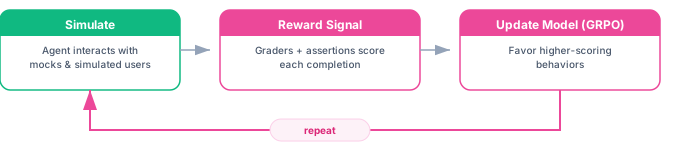
You want the model to get better at tasks where the right approach isn’t obvious from examples alone. You define what success looks like through a reward script, and the model learns to maximize that reward by interacting with the simulation environment. RL can discover strategies that SFT cannot, because it learns from outcomes rather than imitation.
Getting Started
- Supervised Fine-Tuning — Export simulation traces as training data. Fine-tune on Veris or external platforms.
- Reinforcement Learning — Write reward scripts, launch GRPO training runs, monitor progress.
- RL Sandbox — Use Veris dependency sandboxes from SkyRL, NeMo RL, Tinker, or a custom training loop.